Norton AntiVirus Plus: what the plan actually includes, and what it does not
This page is advertising-funded. The buttons below marked “Partner link” go to the advertiser through a tracked redirect, and DILA A ROBOTA s.r.o. is paid a commission if you buy. You pay nothing extra, and the commission does not change the assessment on this page.
vectaris.online is independent and is not affiliated with, endorsed by or sponsored by Gen Digital Inc., the owner of the Norton brand. Prices, plan contents and availability are set by the advertiser and change without notice — the information on the advertiser’s own site prevails over anything written here.
Norton AntiVirus Plus is the cheapest tier in the Norton range. It is a competent single-device antivirus with a firewall, a password manager and a small cloud backup allowance. It is also routinely described — including in the earlier version of this page — as including a VPN and covering a whole household. It does neither. Here is what the plan contains, how the protection works, and where it stops.
What the plan includes
Norton AntiVirus Plus is published by Gen Digital Inc., the company formed when NortonLifeLock — previously Symantec — merged with Avast in 2022. The Norton AntiVirus product line itself goes back to 1991, when Symantec released version 1.0 after acquiring Peter Norton Computing the previous year. That history matters less than people assume, but it does mean the telemetry behind the detection engine is unusually deep.
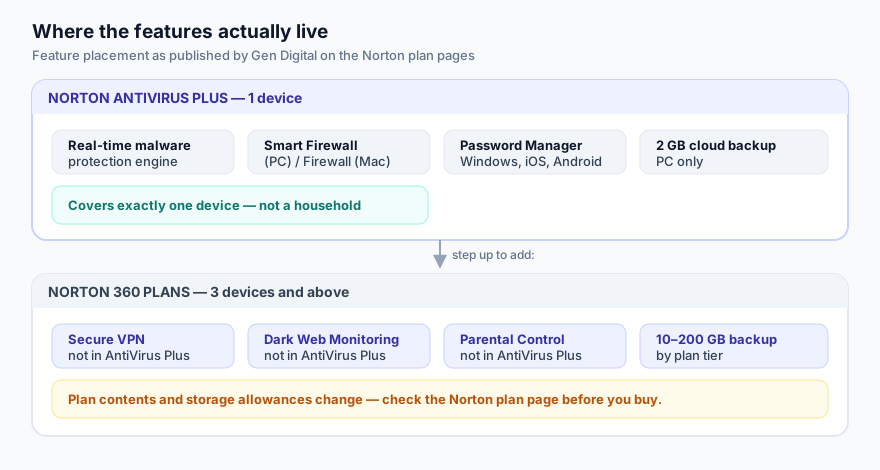
According to Gen Digital’s own plan pages, AntiVirus Plus covers one device — a single Windows PC or a single Mac — and provides:
| Component | In AntiVirus Plus? | Notes |
|---|---|---|
| Real-time malware protection | Yes | The core scanning and behaviour-monitoring engine |
| Smart Firewall | Yes | Called Smart Firewall on Windows, simply Firewall on macOS |
| Password Manager | Yes | Syncs across Windows, iOS and Android |
| Cloud backup | 2 GB | PC only — Norton Cloud Backup is not supported on macOS |
| Secure VPN | No | Sits in the Norton 360 tiers |
| Dark Web Monitoring | No | Norton 360 only |
| Parental Control | No | Norton 360 Deluxe and above; not supported on macOS |
| Devices covered | 1 | Norton 360 plans start at 3 devices |
Gen Digital also attaches a Virus Protection Promise to its consumer subscriptions: if a Norton expert cannot remove a virus from your device, you can request a refund. It is a contractual commitment with its own conditions, not a technical guarantee — read the terms on the advertiser’s site before you rely on it.
Three claims we corrected
An earlier version of this page repeated three things about AntiVirus Plus that are not true. We are leaving the record of the change visible rather than quietly editing it, because that is what our corrections procedure requires.
“It bundles a real VPN.”
It does not. Norton Secure VPN is a feature of the Norton 360 plans. If a VPN is the reason you are buying, AntiVirus Plus is the wrong product.
“One subscription can cover several devices, and a parent can watch them all from one dashboard.”
AntiVirus Plus is a one-device licence. Parental Control is a Norton 360 Deluxe feature and is not available on macOS at all.
“Its false-positive rate is low and its detection is consistently the highest in the industry.”
Too strong, and not something this site can stand behind. Norton scores very well in the independent labs — see below — but ranking is tight at the top, changes test to test, and false-positive results in particular vary. We have replaced the claim with what the published test reports actually say.
How the protection works
Every mainstream antivirus engine, Norton’s included, makes the same decision in three different ways at once, because each method covers the one before it.
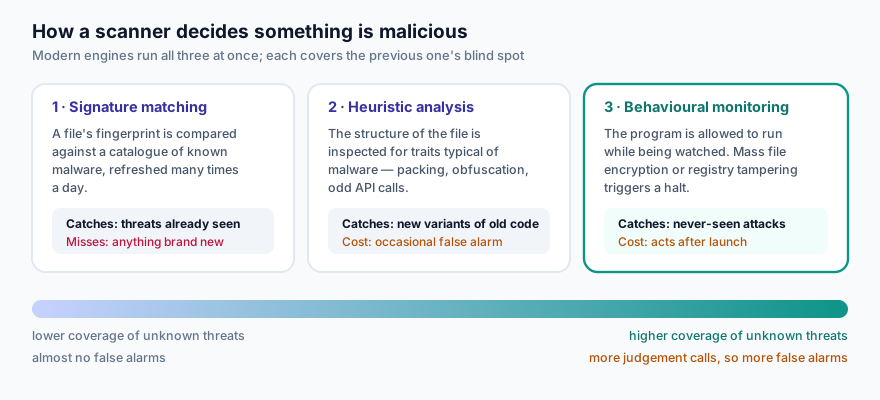
Signature matching is the oldest and the cheapest. The scanner takes a fingerprint of a file and looks it up in a catalogue of known malware that is refreshed many times a day. It is close to perfect on threats that have been seen before and useless on anything that has not.
Heuristic analysis looks at the shape of a file instead of its identity: packing, obfuscation, unusual imports, code that rewrites itself. That lets it flag a new variant of a known family. The cost is judgement — and judgement produces false alarms, which is why a product that quarantines an obscure but legitimate tool you depend on is annoying rather than broken.
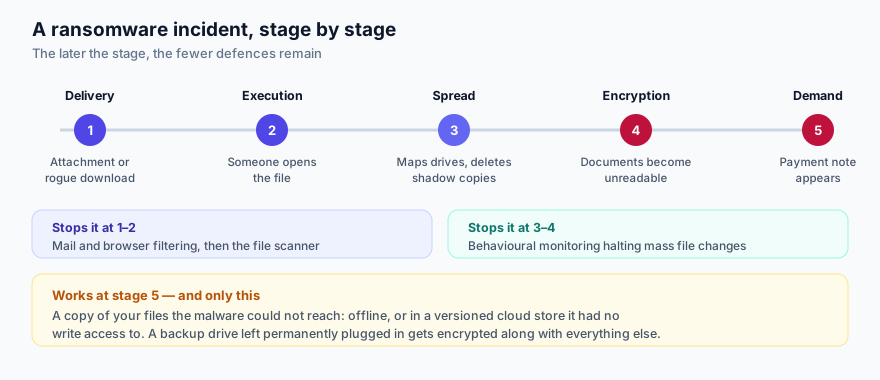
Behavioural monitoring is what actually stops a novel attack. The program is allowed to run while the engine watches it. Start encrypting documents in bulk, start deleting Windows shadow copies, start writing to other processes’ memory, and you get halted and rolled back. This is the layer that matters most against ransomware, and it is the layer that distinguishes current products from the signature scanners of fifteen years ago.
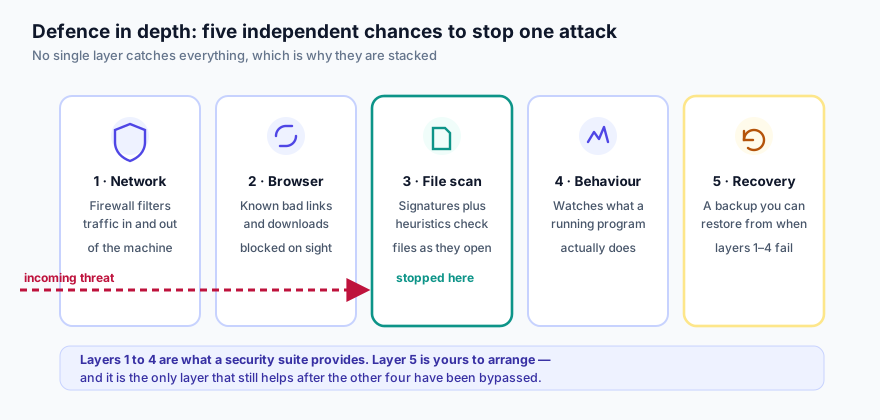
Those three sit inside a wider stack. The firewall filters traffic before anything is scanned; browser protection blocks a known-bad download before it lands; and a backup is the only thing that still helps once everything else has been bypassed.
What independent lab testing shows
Two European laboratories test consumer antivirus products on a published methodology: AV-TEST in Magdeburg and AV-Comparatives in Innsbruck. Both publish their raw results for free, and both are worth more than any review, including this one.
In AV-TEST’s bi-monthly Windows home-user rounds, Norton has repeatedly taken the maximum 6.0 out of 6.0 for protection, with detection of widespread and zero-day malware at or very near 100 per cent across sample sets in the thousands. Two caveats, both important:
- The product AV-TEST submits for these rounds is Norton 360, not AntiVirus Plus. The scanning engine is shared, so the protection result carries over in substance — but the tested package is not the one on sale here.
- At the top of these tables the differences are tiny. A dozen products score 6.0. “Among the best” is defensible; “the best” is not, and anyone telling you otherwise is selling something.
Check the current round yourself before you buy — results move. AV-TEST publishes every result at av-test.org, and AV-Comparatives publishes its Real-World Protection and False Alarm reports at av-comparatives.org.
The threats it is built against
Phishing
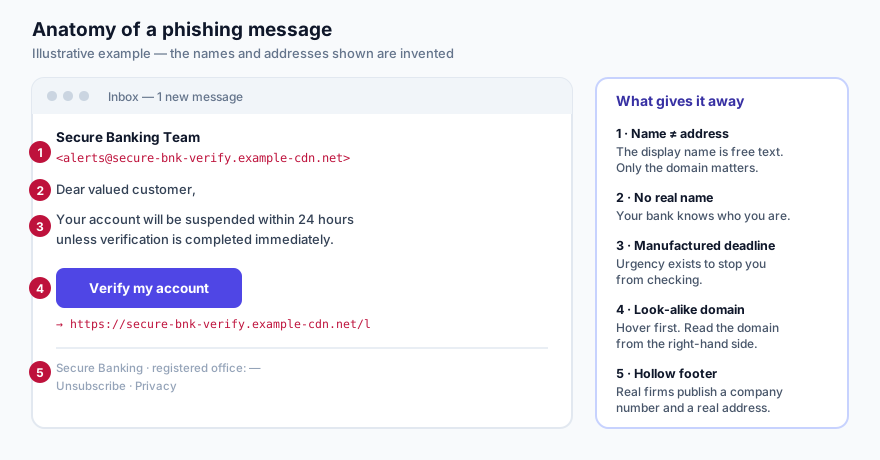
The most common way a home machine gets compromised is not an exotic exploit. It is somebody typing their password into a convincing copy of a login page. Software can block a known phishing domain, but the domains are disposable and new ones appear faster than any blocklist updates. The durable defence is being able to read the message.
Ransomware
Ransomware is the threat where the backup allowance in this plan earns its place — and where 2 GB is the obvious limitation. Once your documents are encrypted, detection is beside the point; what matters is whether a copy exists that the malware could not reach.
Credential theft
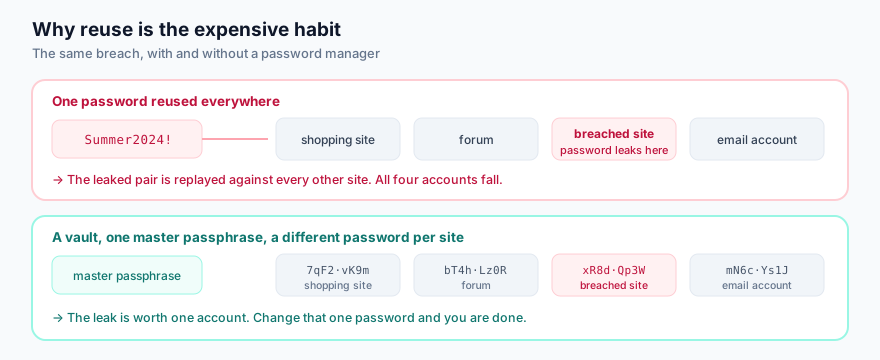
Password reuse turns one site’s breach into a breach of everything you own. This is what the bundled password manager is for, and on balance it is the component of AntiVirus Plus that will change most people’s security the most — more than the scanner.
Where this plan stops
- One device. If you have a laptop and a phone, this plan protects one of them. Costing it as a household purchase is a mistake.
- No VPN. On a Mac, no cloud backup either — Norton Cloud Backup is Windows-only.
- 2 GB of backup is a documents allowance, not a photo library. Treat it as the off-site copy for your irreplaceable files and arrange the rest separately.
- Renewal pricing. Introductory first-year prices on consumer security subscriptions are routinely well below the renewal price. Check what year two costs — it is on the advertiser’s own checkout and terms pages — before you decide.
- It cannot stop you from typing your password into the wrong box. No product can. That is why half of this site is reading guides rather than product pages.
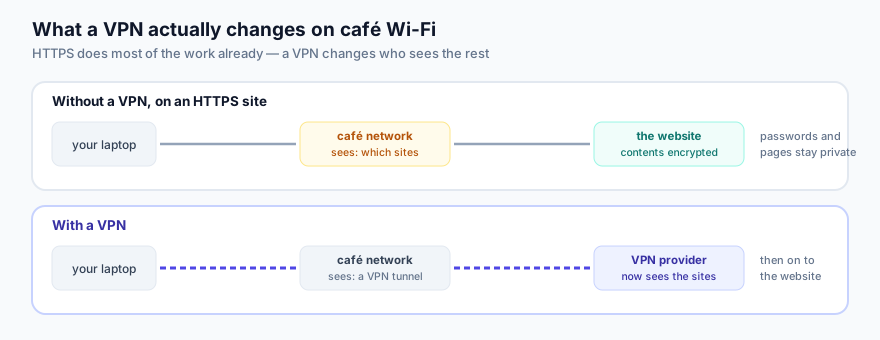
The missing VPN is worth being precise about, because it is oversold in both directions. On an HTTPS site — which is now essentially all of them — the café network already cannot read your passwords or the pages you load. What it can still see is which sites you connect to. A VPN hides that from the local network by moving it to the VPN provider instead, which is a real privacy gain if you have reason to trust the provider more than the café. It is a change of audience, not a cloak.
How it compares
Three honest comparisons, none of which the advertiser would write:
Microsoft Defender
Built into Windows, free, and it scores well in the same AV-TEST rounds. For a careful user who already has a password manager and a backup, it is a legitimate answer. What a paid suite adds is the surrounding furniture, not a fundamentally better scanner.
Norton 360 tiers
The same engine with the VPN, dark web monitoring, parental control and a real backup allowance, across three to ten devices. If more than one device matters to you, this is the comparison to run — not AntiVirus Plus against a rival brand.
Separate best-of-breed tools
A standalone password manager, a standalone backup service and Defender will often cost less and each do their job better. The case for a suite is that one subscription and one dashboard means it actually stays switched on.
A sensible first week
- Install, then run one full scan. Let it finish before you judge the performance impact.
- Confirm automatic updates are on. An antivirus that is not updating is decoration.
- Set the scheduled scan to a time the machine is on but you are not using it.
- Move your passwords into the manager one site at a time, starting with your email account — it is the one that can reset all the others.
- Turn on two-factor authentication on email, banking and your main shopping account.
- Point the 2 GB backup at documents, not photographs, and then test a restore. An untested backup is a hope.
The bottom line
Norton AntiVirus Plus is a reasonable single-device package: a well-regarded engine, a firewall, a genuinely useful password manager and a token amount of cloud backup. It is not a household solution, it has no VPN, and it is not a magic layer that makes careless browsing safe. Buy it with that description in mind and it will do its job. Buy it expecting the feature list the internet tends to attribute to it and you will be disappointed.
Whatever you decide, the advertiser’s own plan page is the authority on what is in the box today. Our description was accurate on 5 October 2026; theirs is accurate now.
Sources
- Gen Digital Inc. — Norton AntiVirus Plus product and plan-comparison pages (us.norton.com/products/norton-antivirus-plus, plan comparison) — device count, feature list, 2 GB PC-only cloud backup, platform limitations.
- AV-TEST GmbH — home-user Windows test rounds (av-test.org) — protection, performance and usability scores for Norton 360.
- AV-Comparatives — Real-World Protection and False Alarm reports (av-comparatives.org).
- Norton AntiVirus release history and the Symantec acquisition of Peter Norton Computing in August 1990 (Wikipedia, Norton AntiVirus), used only for the dating of the product line.
- ENISA — Threat Landscape reports (enisa.europa.eu) — relative prevalence of phishing and ransomware in the EU.
Where this page and the advertiser disagree, the advertiser is right. Plan contents, storage allowances, device counts, prices and promotional terms are set by Gen Digital Inc. and change without notice. Everything above was checked against the advertiser’s published pages on 5 October 2026. Found an error? Tell us — our corrections policy commits us to fixing and dating it.
All diagrams on this page are original SVG files drawn for vectaris.online. No product screenshots, stock photography or third-party images are used anywhere on this site.