Passwords that survive a breach
You cannot stop a website you use from being breached. You can decide in advance how much that breach is worth to whoever buys the data. That decision is made by whether you reuse passwords.
No commercial links on this page. This guide carries no partner links and earns nothing. The site is funded by affiliate commission on its product pages — see how we are funded.
Credential stuffing, and why reuse is the expensive habit
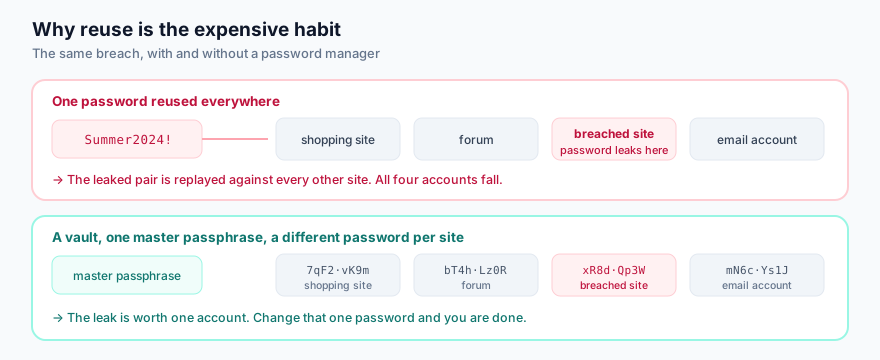
When a site is breached, the email-and-password pairs end up in collections that are traded and eventually published. Attackers then replay those pairs, automatically, against banks, email providers, shops and anything else worth having. This is credential stuffing, and it does not require anybody to target you specifically. It works because reuse is normal.
Your email account deserves special attention: whoever controls it can trigger a password reset on almost everything else you own. Treat it as the key to the house, not as one room.
What makes a password hard to guess
Length, overwhelmingly. Attackers do not sit and type; they run offline guessing against stolen
hashes at enormous rates, so the only property that matters is how many guesses it would take. Each
additional character multiplies that. Complexity rules — one capital, one digit, one symbol
— mostly produce predictable patterns such as Password1! and were dropped from
current guidance for that reason.
Patterns that look clever and are not: a word with letters swapped for digits
(P@ssw0rd), a word plus a year, a keyboard run, your own details in any arrangement.
Guessing tools have all of these built in.
The practical arrangement
- One long passphrase you memorise, for the vault. Four or five unrelated words is both long and memorable: a random phrase of ordinary words beats a short string of symbols. Make it unique — never a password you have used anywhere.
- Everything else generated and stored. Let the manager create long random passwords you never see. You are not supposed to remember them.
- Two-factor authentication on email, banking, and your main shopping account at minimum.
- Migrate gradually. Change passwords as you use each site rather than attempting all of them in one evening — the project that gets abandoned is the one that never helps.
Choosing a second factor
Hardware key
A physical security key using FIDO2 or WebAuthn. The strongest option available to consumers and the only one that is resistant to a convincing phishing site, because the key checks the domain itself. Worth it for your email account.
Authenticator app
A six-digit code generated on your device. Good, widely supported, and a large improvement over SMS. It can still be phished in real time if you type the code into a fake page.
SMS codes
Weakest of the three — vulnerable to SIM-swap fraud and to interception. Still far better than no second factor. Use it where nothing else is offered.
Is a password manager safe?
The fair objection is that it concentrates risk: one vault, everything in it. Two things make the trade worth taking for almost everyone.
- Reputable managers encrypt the vault on your device with a key derived from your master passphrase, so the provider stores a blob it cannot read. A breach of the provider does not hand anyone your passwords — though a weak master passphrase would.
- The alternative is not a perfect memory. It is reuse, which is a certainty of compromise rather than a risk of one.
Managers come bundled with security suites — the plan on our product page includes one — and also exist as standalone products, including open-source options you can host yourself. Any of them beats reuse. Pick one you will actually open.
Checking whether you are already in a breach
Have I Been Pwned, run by security researcher Troy Hunt, lets you check an email address against known breach collections. Finding yourself listed is common and not an emergency; it means change the password on that service, and anywhere you reused it. Never enter a password into a checking site — an address is enough.
Sources
- UK National Cyber Security Centre, password guidance — the three-random-words approach and why complexity rules were dropped.
- NIST Special Publication 800-63B, Digital Identity Guidelines — length over composition rules; no forced periodic rotation.
- Have I Been Pwned — breach exposure checking.