Ransomware: what actually helps
Ransomware is the one category where the outcome is decided before the attack happens. Either a copy of your files exists somewhere the malware could not reach, or it does not. Everything else is about buying time.
No commercial links on this page. This guide carries no partner links and earns nothing. The site is funded by affiliate commission on its product pages — see how we are funded.
What it does, stage by stage
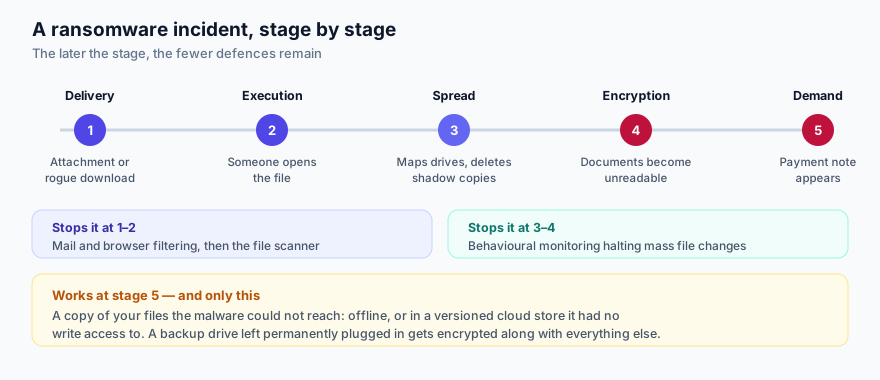
1 · Delivery
An attachment, a link, a cracked application, or an exploit against software that was not patched. Nothing clever is required at this stage and nothing clever is usually attempted.
2 · Execution
Somebody opens it, or enables macros because the document says it is “protected”. This is where a file scanner gets its one chance at a known sample.
3 · Spread and preparation
Before encrypting anything, modern ransomware looks around: mapped network drives, attached USB disks, cloud folders that are synchronised locally. It commonly deletes Windows Volume Shadow Copies so that “Restore previous versions” will not work. Anything your user account can write to is in scope — which includes the external drive you leave permanently plugged in.
4 · Encryption
Files are encrypted with a key the attacker holds. The file names change, the documents stop opening. Behavioural monitoring in a current security product can detect mass file modification and halt it part-way, sometimes rolling back what was touched. Part-way is a real improvement over all the way, and it is not the same as nothing happening.
5 · The demand
A note appears. By this point no antivirus is relevant; the question is purely whether you can restore. Many campaigns now also exfiltrate a copy of the files first and threaten publication, which a backup does not protect you from — it protects your access, not your privacy.
Why a backup is the whole answer, and what makes one real
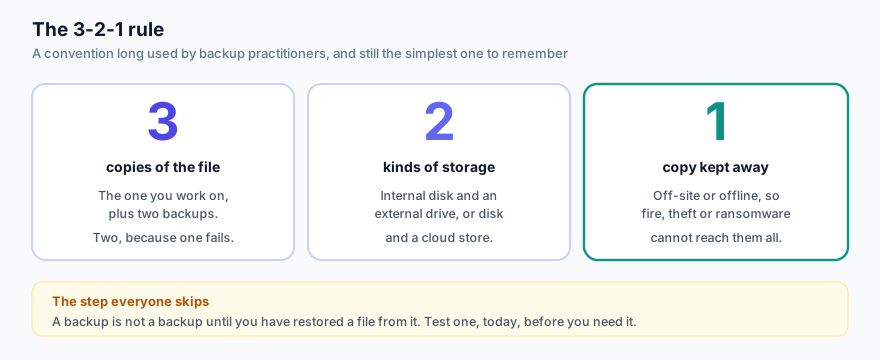
A backup only counts if the ransomware could not write to it:
- Offline — a drive that is unplugged except while a backup is running. Unglamorous and extremely effective.
- Versioned — a service that keeps previous versions of a file, so you can roll back to before the encryption. Check how far back the history goes and whether your plan includes it.
- Credentialed separately — a destination your everyday account cannot simply overwrite.
A synchronisation folder is not a backup. If the local copy is encrypted, the service faithfully synchronises the encrypted version. Some providers keep version history that lets you recover anyway, but that is a feature you must confirm you have, not a property of sync.
Should you pay?
Law enforcement agencies across the EU advise against it, for reasons that hold up: payment funds the next campaign, marks you as a payer, and buys only a promise. Decryptors supplied after payment are frequently slow or incomplete.
Before considering anything, check No More Ransom — a joint project of Europol, the Dutch police and a number of security vendors that publishes free decryption tools for families whose keys have been recovered. It is free, it is legitimate, and it costs nothing to look.
If it has already happened
- Disconnect the machine from the network — cable out, Wi-Fi off — to stop it reaching shared drives.
- Do not delete the encrypted files. A decryptor may appear later.
- Photograph the ransom note. It identifies the family, which determines whether a free decryptor exists.
- Check nomoreransom.org.
- Report it. In the Czech Republic, NÚKIB (nukib.gov.cz) and the police.
- Rebuild from a known-good backup. Reinstall the operating system rather than cleaning in place if anything about the machine is in doubt.
The boring prevention list, in order of effect
- A tested, offline or versioned backup.
- Operating system and application updates installed promptly — unpatched software is a delivery route you can close for free.
- A security product with behavioural ransomware protection, kept updated. Our product page covers one such plan.
- Not running unknown executables, and not enabling macros on documents from outside.
- Two-factor authentication on remote access and on the accounts that could be used to reach your files.
Sources
- No More Ransom — Europol, Politie and industry partners; free decryptors and prevention advice.
- ENISA, Threat Landscape — ransomware trends in the EU.
- NÚKIB nukib.gov.cz — Czech national guidance and incident reporting.